 itOffside
การอัพโหลดรูปภาพและ resize แบบ AJAX โดยใช้ PHP และ jQuery
Ajax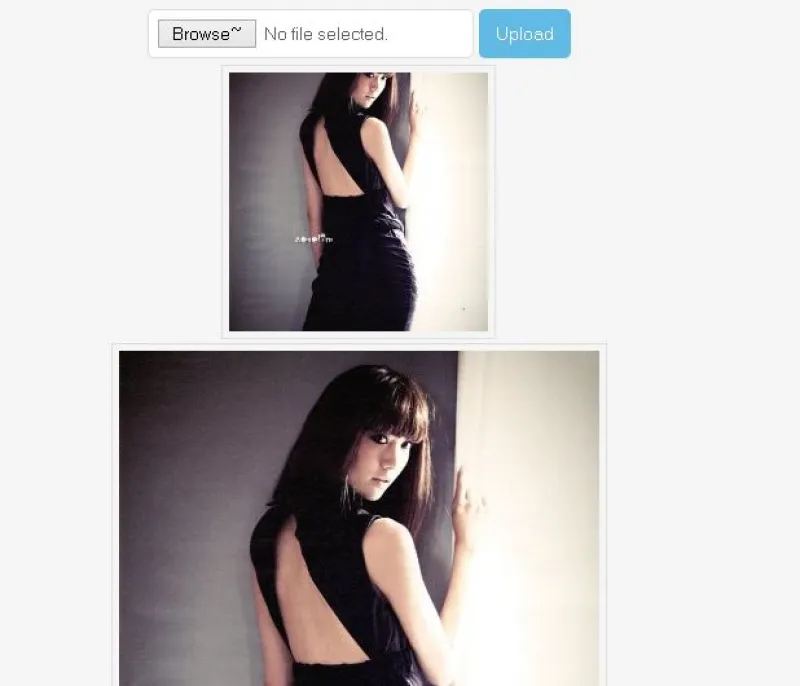
ปัจจุบันการอัพโหลดไฟล์รูปภาพและ resize ขนาดรูปภาพ มี code ดาวน์โหลดให้เลือกใช้งานมากมายแต่บทความในบทความนี้ผมแนะนำการอัพโหลดไฟล์รูปภาพแบบ AJAX โดยใช้ PHP และ ใช้ jQuery เป็นเครื่องมือในการอัพโหลดรูปภาพซึ่งการอัพโหลดรูปภาพแบบ AJAX นั้นมีจุดเด่นคือไม่ต้อง Refresh หน้าเว็บเพจจึงทำให้การอัพโหลดมีความรวดเร็วและใช้ Data Transfer น้อยลง โดยผมจะใช้เทคนิค HTML5 File API ในการตรวจสอบขนาดไฟล์และประเภทของไฟล์ก่อนที่จะอัพโหลดจากนั้นผมจะสร้างไฟล์รูปภาพ 2 ไฟล์ คือไฟล์รูปภาพ Original และ รูปภาพแบบปรับขนาดแล้ว สำหรับบทความนี้เน้นการใช้งานพื้นฐานและง่ายต่อการเรียนรู้และเข้าใจ
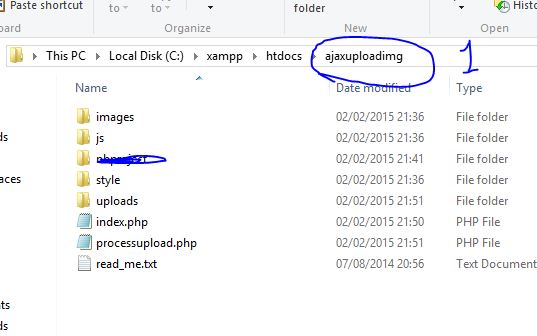
รูปภาพโครงสร้างโฟล์เดอร์และไฟล์ ในบทความนี้ ผมสร้างโปรเจ็คชื่อว่า ajaxuploadimg จะเห็นได้ว่าไฟล์ที่จำเป็นต้องใช้งานมีดังนี้
1. ไฟล์ index.php ทำหน้าที่แสดงหน้าจออัพโหลดและส่งข้อมูลอัพโหลดผ่าน AJAX
2. ไฟล์ processupload.php ทำหน้าอัพโหลดรูปภาพโดยใช้ภาษา PHP คุณสามารถตั้งค่าการอัพโหลดได้ที่ไฟล์นี้ เช่นกำหนดขนาดรูปภาพ กำหนดพาธที่เก็บรูปภาพ
3. โฟล์เดอร์ uploads ทำหน้าที่เก็บรูปภาพที่อัพโหลด
4. โฟล์เดอร์ js/images/style เก็บไฟล์ที่จำเป็นต้องเรียกใช้งานเช่น jquery.form เป็นต้น
โดยไฟล์เหล่านี้สามารถดาวน์โหลดได้ที่ด้านล่างบทความ
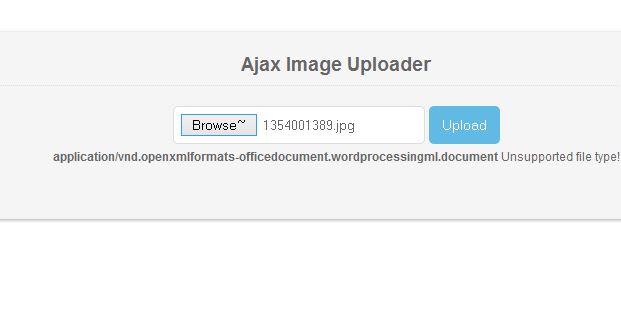
1. สร้างฟอร์ม Upload รูปภาพ ให้คุณสร้างไฟล์ index.php ขึ้นมาแล้วนำ Code นี้ไปใส่ภายใน Tag <Body>
 <form action="processupload.php" method="post" enctype="multipart/form-data" id="MyUploadForm">
 <input name="image_file" id="imageInput" type="file" />
 <input type="submit" id="submit-btn" value="Upload" />
 <img src="images/ajax-loader.gif" id="loading-img" style="display:none;" alt="Please Wait"/>
 </form>
 <div id="output"></div>
ผลลัพธ์
2. ในบทความนี้มีการเรียกใช้งาน jQuery เพื่อให้การสร้าง code ง่ายขึ้นโดยปลักอิน jQuery ทำหน้าที่ในการสร้าง AJAX upload เมื่อมีการคลิกปุ่ม Upload (พร้อมกับการตรวจสอบไฟล์รูปภาพ)
ให้คุณนำ code นี้ไปใส่ในส่วนของ <head> ในไฟล์ index.php
<script type="text/javascript" src="js/jquery-1.10.2.min.js"></script>
 <script type="text/javascript" src="js/jquery.form.min.js"></script>

 <script type="text/javascript">
 $(document).ready(function () {
 var options = {
 target: '#output', // target element(s) to be updated with server response
 beforeSubmit: beforeSubmit, // pre-submit callback
 success: afterSuccess, // post-submit callback
 resetForm: true // reset the form after successful submit
 };

 $('#MyUploadForm').submit(function () {
 $(this).ajaxSubmit(options);
 // always return false to prevent standard browser submit and page navigation
 return false;
 });
 });

 function afterSuccess()
 {
 $('#submit-btn').show(); //hide submit button
 $('#loading-img').hide(); //hide submit button

 }

 //function to check file size before uploading.
 function beforeSubmit() {
 //check whether browser fully supports all File API
 if (window.File && window.FileReader && window.FileList && window.Blob)
 {

 if (!$('#imageInput').val()) //check empty input filed
 {
 $("#output").html("Are you kidding me?");
 return false
 }

 var fsize = $('#imageInput')[0].files[0].size; //get file size
 var ftype = $('#imageInput')[0].files[0].type; // get file type


 //allow only valid image file types
 switch (ftype)
 {
 case 'image/png':
 case 'image/gif':
 case 'image/jpeg':
 case 'image/pjpeg':
 break;
 default:
 $("#output").html("<b>" + ftype + "</b> Unsupported file type!");
 return false
 }

 //Allowed file size is less than 1 MB (1048576)
 if (fsize > 1048576)
 {
 $("#output").html("<b>" + bytesToSize(fsize) + "</b> Too big Image file! <br />Please reduce the size of your photo using an image editor.");
 return false
 }

 $('#submit-btn').hide(); //hide submit button
 $('#loading-img').show(); //hide submit button
 $("#output").html("");
 }
 else
 {
 //Output error to older browsers that do not support HTML5 File API
 $("#output").html("Please upgrade your browser, because your current browser lacks some new features we need!");
 return false;
 }
 }

 //function to format bites bit.ly/19yoIPO
 function bytesToSize(bytes) {
 var sizes = ['Bytes', 'KB', 'MB', 'GB', 'TB'];
 if (bytes == 0)
 return '0 Bytes';
 var i = parseInt(Math.floor(Math.log(bytes) / Math.log(1024)));
 return Math.round(bytes / Math.pow(1024, i), 2) + ' ' + sizes[i];
 }

 </script>
 <link href="style/style.css" rel="stylesheet" type="text/css">
และไฟล์ index.php มี code เป็นดังนี้
<!DOCTYPE HTML>
<html>
 <head>
 <meta http-equiv="Content-Type" content="text/html; charset=utf-8" />
 <title>Ajax Upload and Resize with jQuery and PHP - Demo</title>
 <script type="text/javascript" src="js/jquery-1.10.2.min.js"></script>
 <script type="text/javascript" src="js/jquery.form.min.js"></script>

 <script type="text/javascript">
 $(document).ready(function () {
 var options = {
 target: '#output', // target element(s) to be updated with server response
 beforeSubmit: beforeSubmit, // pre-submit callback
 success: afterSuccess, // post-submit callback
 resetForm: true // reset the form after successful submit
 };

 $('#MyUploadForm').submit(function () {
 $(this).ajaxSubmit(options);
 // always return false to prevent standard browser submit and page navigation
 return false;
 });
 });

 function afterSuccess()
 {
 $('#submit-btn').show(); //hide submit button
 $('#loading-img').hide(); //hide submit button

 }

 //function to check file size before uploading.
 function beforeSubmit() {
 //check whether browser fully supports all File API
 if (window.File && window.FileReader && window.FileList && window.Blob)
 {

 if (!$('#imageInput').val()) //check empty input filed
 {
 $("#output").html("Are you kidding me?");
 return false
 }

 var fsize = $('#imageInput')[0].files[0].size; //get file size
 var ftype = $('#imageInput')[0].files[0].type; // get file type


 //allow only valid image file types
 switch (ftype)
 {
 case 'image/png':
 case 'image/gif':
 case 'image/jpeg':
 case 'image/pjpeg':
 break;
 default:
 $("#output").html("<b>" + ftype + "</b> Unsupported file type!");
 return false
 }

 //Allowed file size is less than 1 MB (1048576)
 if (fsize > 1048576)
 {
 $("#output").html("<b>" + bytesToSize(fsize) + "</b> Too big Image file! <br />Please reduce the size of your photo using an image editor.");
 return false
 }

 $('#submit-btn').hide(); //hide submit button
 $('#loading-img').show(); //hide submit button
 $("#output").html("");
 }
 else
 {
 //Output error to older browsers that do not support HTML5 File API
 $("#output").html("Please upgrade your browser, because your current browser lacks some new features we need!");
 return false;
 }
 }

 //function to format bites bit.ly/19yoIPO
 function bytesToSize(bytes) {
 var sizes = ['Bytes', 'KB', 'MB', 'GB', 'TB'];
 if (bytes == 0)
 return '0 Bytes';
 var i = parseInt(Math.floor(Math.log(bytes) / Math.log(1024)));
 return Math.round(bytes / Math.pow(1024, i), 2) + ' ' + sizes[i];
 }

 </script>
 <link href="style/style.css" rel="stylesheet" type="text/css">
 </head>
 <body>
 <div id="upload-wrapper">
 <div align="center">
 <h3>Ajax Image Uploader</h3>
 <form action="processupload.php" method="post" enctype="multipart/form-data" id="MyUploadForm">
 <input name="image_file" id="imageInput" type="file" />
 <input type="submit" id="submit-btn" value="Upload" />
 <img src="images/ajax-loader.gif" id="loading-img" style="display:none;" alt="Please Wait"/>
 </form>
 <div id="output"></div>
 </div>
 </div>

 </body>
</html>
3. ทำการสร้างไฟล์ processupload.php แล้วนำ code ไปใส่
อธิบายสำหรับไฟล์นี้ ใช้สำหรับตั้งค่าต่างๆเช่น กำหนดที่อยู่ในการอัพโหลดหรือ ขนาดไฟล์ที่จะอัพโหลด เป็นต้นโดยคุณสามารถกำหนดการตั้งค่าได้ที่ไฟล์นี้
<?php

############ Configuration ##############
$thumb_square_size = 200; //Thumbnails will be cropped to 200x200 pixels
$max_image_size = 500; //Maximum image size (height and width)
$thumb_prefix = "thumb_"; //Normal thumb Prefix
$destination_folder = $_SERVER['DOCUMENT_ROOT'] . "/ajaxuploadimg/uploads/"; //upload directory ends with / (slash)
$jpeg_quality = 90; //jpeg quality
##########################################
//continue only if $_POST is set and it is a Ajax request
if (isset($_POST) && isset($_SERVER['HTTP_X_REQUESTED_WITH']) && strtolower($_SERVER['HTTP_X_REQUESTED_WITH']) == 'xmlhttprequest') {

 // check $_FILES['ImageFile'] not empty
 if (!isset($_FILES['image_file']) || !is_uploaded_file($_FILES['image_file']['tmp_name'])) {
 die('Image file is Missing!'); // output error when above checks fail.
 }

 //uploaded file info we need to proceed
 $image_name = $_FILES['image_file']['name']; //file name
 $image_size = $_FILES['image_file']['size']; //file size
 $image_temp = $_FILES['image_file']['tmp_name']; //file temp

 $image_size_info = getimagesize($image_temp); //get image size

 if ($image_size_info) {
 $image_width = $image_size_info[0]; //image width
 $image_height = $image_size_info[1]; //image height
 $image_type = $image_size_info['mime']; //image type
 } else {
 die("Make sure image file is valid!");
 }

 //switch statement below checks allowed image type
 //as well as creates new image from given file
 switch ($image_type) {
 case 'image/png':
 $image_res = imagecreatefrompng($image_temp);
 break;
 case 'image/gif':
 $image_res = imagecreatefromgif($image_temp);
 break;
 case 'image/jpeg': case 'image/pjpeg':
 $image_res = imagecreatefromjpeg($image_temp);
 break;
 default:
 $image_res = false;
 }

 if ($image_res) {
 //Get file extension and name to construct new file name
 $image_info = pathinfo($image_name);
 $image_extension = strtolower($image_info["extension"]); //image extension
 $image_name_only = strtolower($image_info["filename"]); //file name only, no extension
 //create a random name for new image (Eg: fileName_293749.jpg) ;
 $new_file_name = $image_name_only . '_' . rand(0, 9999999999) . '.' . $image_extension;

 //folder path to save resized images and thumbnails
 $thumb_save_folder = $destination_folder . $thumb_prefix . $new_file_name;
 $image_save_folder = $destination_folder . $new_file_name;

 //call normal_resize_image() function to proportionally resize image
 if (normal_resize_image($image_res, $image_save_folder, $image_type, $max_image_size, $image_width, $image_height, $jpeg_quality)) {
 //call crop_image_square() function to create square thumbnails
 if (!crop_image_square($image_res, $thumb_save_folder, $image_type, $thumb_square_size, $image_width, $image_height, $jpeg_quality)) {
 die('Error Creating thumbnail');
 }

 /* We have succesfully resized and created thumbnail image
 We can now output image to user's browser or store information in the database */
 echo '<div align="center">';
 echo '<img src="uploads/' . $thumb_prefix . $new_file_name . '" alt="Thumbnail">';
 echo '<br />';
 echo '<img src="uploads/' . $new_file_name . '" alt="Resized Image">';
 echo '</div>';
 }

 imagedestroy($image_res); //freeup memory
 }
}

##### This function will proportionally resize image #####

function normal_resize_image($source, $destination, $image_type, $max_size, $image_width, $image_height, $quality) {

 if ($image_width <= 0 || $image_height <= 0) {
 return false;
 } //return false if nothing to resize
 //do not resize if image is smaller than max size
 if ($image_width <= $max_size && $image_height <= $max_size) {
 if (save_image($source, $destination, $image_type, $quality)) {
 return true;
 }
 }

 //Construct a proportional size of new image
 $image_scale = min($max_size / $image_width, $max_size / $image_height);
 $new_width = ceil($image_scale * $image_width);
 $new_height = ceil($image_scale * $image_height);

 $new_canvas = imagecreatetruecolor($new_width, $new_height); //Create a new true color image
 //Copy and resize part of an image with resampling
 if (imagecopyresampled($new_canvas, $source, 0, 0, 0, 0, $new_width, $new_height, $image_width, $image_height)) {
 save_image($new_canvas, $destination, $image_type, $quality); //save resized image
 }

 return true;
}

##### This function corps image to create exact square, no matter what its original size! ######

function crop_image_square($source, $destination, $image_type, $square_size, $image_width, $image_height, $quality) {
 if ($image_width <= 0 || $image_height <= 0) {
 return false;
 } //return false if nothing to resize

 if ($image_width > $image_height) {
 $y_offset = 0;
 $x_offset = ($image_width - $image_height) / 2;
 $s_size = $image_width - ($x_offset * 2);
 } else {
 $x_offset = 0;
 $y_offset = ($image_height - $image_width) / 2;
 $s_size = $image_height - ($y_offset * 2);
 }
 $new_canvas = imagecreatetruecolor($square_size, $square_size); //Create a new true color image
 //Copy and resize part of an image with resampling
 if (imagecopyresampled($new_canvas, $source, 0, 0, $x_offset, $y_offset, $square_size, $square_size, $s_size, $s_size)) {
 save_image($new_canvas, $destination, $image_type, $quality);
 }

 return true;
}

##### Saves image resource to file #####

function save_image($source, $destination, $image_type, $quality) {
 switch (strtolower($image_type)) {//determine mime type
 case 'image/png':
 imagepng($source, $destination);
 return true; //save png file
 break;
 case 'image/gif':
 imagegif($source, $destination);
 return true; //save gif file
 break;
 case 'image/jpeg': case 'image/pjpeg':
 imagejpeg($source, $destination, $quality);
 return true; //save jpeg file
 break;
 default: return false;
 }
}
ผลลัพธ์
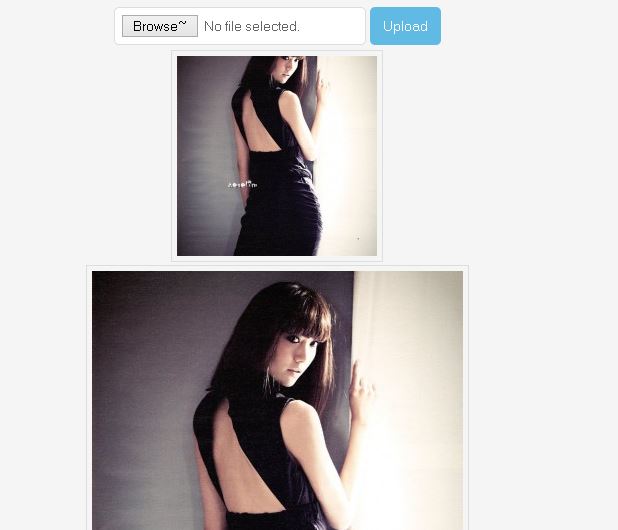
สำหรับลิงค์ดาวน์โหลดไฟล์ทั้งหมด สามารถดาวน์โหลดได้ที่นี้ คลิกที่นี้เพื่อดาวน์โหลด
สำหรับบทความนี้ก็จบแล้วสำหรับเรื่อง การอัพโหลดโดยใช้ PHP และ AJAX และขอบคุณสำหรับผู้พัฒนา Code ที่เว็บ http://www.sanwebe.com/2012/05/ajax-image-upload-and-resize-with-jquery-and-php
หากใครมีข้อสงสัยหรือคำถามสามารถเขียนคำถามไว้ใน Comment ได้เลยครับ
แชร์บทความนี้
โปรแกรมเมอร์

ความเห็น (3)