 itOffside
PHP Workshop ระบบตะกร้าสั่งซื้อสินค้า (Shopping Cart)
PHP
PHP Workshop ระบบตะกร้าสั่งซื้อสินค้า เป็นตัวอย่าง Code โดยใช้ความฟังก์ชั่น PHP Array และ ฟังก์ชั่น Session ในการทำงานของระบบตะกร้าโดยดึงข้อมูลสินค้าจาก MySQL (ฐานข้อมูล) มาแสดง ส่วนหลักการทำงานของ Code นั้นเป็นหลักการทำงานแบบง่ายๆ ผู้อ่านและผู้ศึกษาสามารถทำความเข้าใจในบทความนี้ได้อย่างรวดเร็ว โดยจะมีรูปภาพพร้อมคำบรรยายประกอบใต้ภาพ
ความสามารถของระบบ Shopping cart ที่ผู้เขียนได้สร้างขึ้นนั้นมีดังต่อไปนี้
- แสดงรายการสินค้าจากฐานข้อมูลโดยใช้ฐานข้อมูล MySQL
- เก็บข้อมูลของสินค้าลงในตะกร้าสินค้าโดยใช้ Session และ Array
- เก็บสินค้าลงในตะกร้าสินค้าซ้ำรายการได้โดยนำไปเพิ่มจำนวนที่มีอยู่ (บันทึกเพิ่มจำนวน)
- แสดงจำนวนสินค้าในตะกร้าสินค้า
- กำหนดจำนวนสินค้าในหน้าตะกร้าสินค้าได้ตามที่ต้องการ
- ลบสินค้าออกจากตะกร้าสินค้าได้ตามที่ต้องการ
- ระบบจัดเก็บข้อมูลการสั่งซื้อพร้อมรายละเอียดผู้สั่งซื้อลงในฐานข้อมูล MySQL
สร้างฐานข้อมูลชื่อ shopping_cart หลังจากสร้างเสร็จเรียบร้อยแล้วให้นำ Script SQL ด้านล่างนี้ไป Run เพื่อทำการสร้างตาราง
— phpMyAdmin SQL Dump
— version 4.0.9
— http://www.phpmyadmin.net
—
— Host: 127.0.0.1
— Generation Time: Apr 15, 2014 at 06:58 PM
— Server version: 5.5.34
— PHP Version: 5.4.22

SET SQL_MODE = “NO_AUTO_VALUE_ON_ZERO”;
SET time_zone = “+00:00”;

—
— Database: `shopping_cart`
—

— ——————————————————–

—
— Table structure for table `orders`
—

CREATE TABLE IF NOT EXISTS `orders` (
`id` int(11) NOT NULL AUTO_INCREMENT,
`order_date` datetime NOT NULL,
`order_fullname` varchar(100) COLLATE utf8_unicode_ci NOT NULL,
`order_address` tinytext COLLATE utf8_unicode_ci NOT NULL,
`order_phone` varchar(10) COLLATE utf8_unicode_ci NOT NULL,
PRIMARY KEY (`id`)
) ENGINE=MyISAM DEFAULT CHARSET=utf8 COLLATE=utf8_unicode_ci AUTO_INCREMENT=5 ;

—
— Table structure for table `order_details`
—

CREATE TABLE IF NOT EXISTS `order_details` (
`id` int(11) NOT NULL AUTO_INCREMENT,
`order_detail_quantity` tinyint(4) NOT NULL,
`order_detail_price` decimal(10,2) NOT NULL,
`product_id` int(11) NOT NULL,
`order_id` int(11) NOT NULL,
PRIMARY KEY (`id`)
) ENGINE=MyISAM DEFAULT CHARSET=utf8 COLLATE=utf8_unicode_ci AUTO_INCREMENT=9 ;

—
— Table structure for table `products`
—

CREATE TABLE IF NOT EXISTS `products` (
`id` int(11) NOT NULL AUTO_INCREMENT,
`product_code` varchar(60) COLLATE utf8_unicode_ci NOT NULL,
`product_name` varchar(60) COLLATE utf8_unicode_ci NOT NULL,
`product_desc` tinytext COLLATE utf8_unicode_ci NOT NULL,
`product_img_name` varchar(60) COLLATE utf8_unicode_ci NOT NULL,
`product_price` decimal(10,2) NOT NULL,
PRIMARY KEY (`id`),
UNIQUE KEY `product_code` (`product_code`)
) ENGINE=MyISAM DEFAULT CHARSET=utf8 COLLATE=utf8_unicode_ci AUTO_INCREMENT=4 ;

—
— Dumping data for table `products`
—

INSERT INTO `products` (`id`, `product_code`, `product_name`, `product_desc`, `product_img_name`, `product_price`) VALUES
(1, ‘P00001’, ‘iPhone 5s’, ‘โทรศัพท์คุณภาพยี่ห้อ Apple’, ‘iphone5s.jpg’, ‘25000.00’),
(2, ‘P00002’, ‘Samsung Galaxy S4’, ‘โทรศัพท Andriod ยอดนิยม’, ‘ss4.jpg’, ‘17890.00’),
(3, ‘P00003’, ‘Samsung Galaxy Note3’, ‘โทรศัพท์สำหรับคนชอบจด’, ‘note3.jpg’, ‘23000.00’);
1. สร้างไฟล์เชื่อมต่อฐานข้อมูลชื่อ connect.php แล้วนำโค๊ดด้านล่างนี้ใส่
<?php
/*
 * set var
 */
$cfHost = "localhost";
$cfUser = "root";
$cfPassword = "";
$cfDatabase = "shopping_cart";

/*
 * connection mysql
 */
$meConnect = mysql_connect($cfHost, $cfUser, $cfPassword) or die("Error conncetion mysql...");
$meDatabase = mysql_select_db($cfDatabase);
mysql_query("SET NAMES UTF8");
?>
2. คัดลอกโฟล์เดอร์ Bootstrap และโฟล์เดอร์ images ไปวางในโฟล์เดอร์โปรเจ็ค เช่น www/shopping_cart/ เป็นต้น โดยสามารถดาวน์โหลดไฟล์ได้จากด้านล่างบทความเรื่องนี้ (ท้ายบทความ)
3. สร้าง Project ใหม่แล้ว เพิ่ม code ในตัวอย่างด้านล่างนี้ลงไปในไฟล์ index.php ซึ่งการทำงานของไฟล์ index.php นี้จะแสดงรายการสินค้าที่จะทำการหยิบใส่ตะกร้า
<?php
session_start();
require 'connect.php';
$meSql = "SELECT * FROM products ";
$meQuery = mysql_query($meSql);
$action = isset($_GET['a']) ? $_GET['a'] : "";
$itemCount = isset($_SESSION['cart']) ? count($_SESSION['cart']) : 0;
if(isset($_SESSION['qty'])){
$meQty = 0;
foreach($_SESSION['qty'] as $meItem){
$meQty = $meQty + $meItem;
}
}else{
$meQty=0;
}
?>
<!DOCTYPE html>
<html lang="en">
<head>
<meta charset="utf-8">
<meta http-equiv="X-UA-Compatible" content="IE=edge">
<meta name="viewport" content="width=device-width, initial-scale=1">
<title>itoffside.com shopping cart</title>
<!-- Bootstrap -->
<link href="bootstrap/css/bootstrap.min.css" rel="stylesheet">
<link href="bootstrap/css/nava.css" rel="stylesheet">
<!-- HTML5 Shim and Respond.js IE8 support of HTML5 elements and media queries -->
<!-- WARNING: Respond.js doesn't work if you view the page via file:// -->
<!--[if lt IE 9]>
<script src="https://oss.maxcdn.com/libs/html5shiv/3.7.0/html5shiv.js"></script>
<script src="https://oss.maxcdn.com/libs/respond.js/1.4.2/respond.min.js"></script>
<![endif]-->
</head>
<body>
<div class="container">
<!-- Static navbar -->
<div class="navbar navbar-default" role="navigation">
<div class="container-fluid">
<div class="navbar-header">
<button type="button" class="navbar-toggle" data-toggle="collapse" data-target=".navbar-collapse">
<span class="sr-only">Toggle navigation</span>
<span class="icon-bar"></span>
<span class="icon-bar"></span>
<span class="icon-bar"></span>
</button>
<a class="navbar-brand" href="#">Shopping Cart - ItOffside.com</a>
</div>
<div class="navbar-collapse collapse">
<ul class="nav navbar-nav">
<li class="active"><a href="index.php">หน้าแรกสินค้า</a></li>
<li><a href="cart.php">ตะกร้าสินค้าของฉัน <span class="badge"><?php echo $meQty; ?></span></a></li>
</ul>
</div><!--/.nav-collapse -->
</div><!--/.container-fluid -->
</div>
<!-- Main component for a primary marketing message or call to action -->
<h3>หน้าแรกของสินค้า</h3>
<?php
if($action == 'exists'){
echo "<div class=\"alert alert-warning\">เพิ่มจำนวนสินค้าแล้ว</div>";
}
if($action == 'add'){
echo "<div class=\"alert alert-success\">เพิ่มสินค้าลงในตะกร้าเรียบร้อยแล้ว</div>";
}
if($action == 'order'){
echo "<div class=\"alert alert-success\">สั่งซื้อสินค้าเรียบร้อยแล้ว</div>";
}
if($action == 'orderfail'){
echo "<div class=\"alert alert-warning\">สั่งซื้อสินค้าไม่สำเร็จ มีข้อผิดพลาดเกิดขึ้นกรุณาลองใหม่อีกครั้ง</div>";
}
?>
<table class="table table-striped">
<thead>
<tr>
<th>#</th>
<th>รหัสสินค้า</th>
<th>ชื่อสินค้า</th>
<th>รายละเอียด</th>
<th>ราคา</th>
<th> </th>
</tr>
</thead>
<tbody>
<?php
while ($meResult = mysql_fetch_assoc($meQuery))
{
?>
<tr>
<td><img src="images/<?php echo $meResult['product_img_name']; ?>" border="0"></td>
<td><?php echo $meResult['product_code']; ?></td>
<td><?php echo $meResult['product_name']; ?></td>
<td><?php echo $meResult['product_desc']; ?></td>
<td><?php echo number_format($meResult['product_price'],2); ?></td>
<td>
<a class="btn btn-primary btn-lg" href="updatecart.php?itemId=<?php echo $meResult['id']; ?>" role="button">
<span class="glyphicon glyphicon-shopping-cart"></span>
หยิบใส่ตะกร้า</a>
</td>
</tr>
<?php
}
?>
</tbody>
</table>
</div> <!-- /container -->
<!-- jQuery (necessary for Bootstrap's JavaScript plugins) -->
<script src="bootstrap/js/jquery.min.js"></script>
<!-- Include all compiled plugins (below), or include individual files as needed -->
<script src="bootstrap/js/bootstrap.min.js"></script>
</body>
</html>
<?php
mysql_close();
?>ผลลัพธ์จากไฟล์ index.php
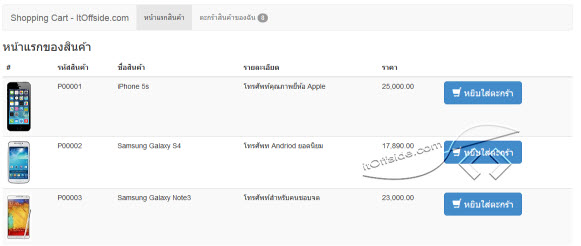
4. สร้างไฟล์ cart.php แล้วนำ code ด้านล่างไปใส่ การทำงานของไฟล์นี้เป็นการแสดงรายการสินค้าในตะกร้าโดย session จะเก็บข้อมูล id ของสินค้า แล้วนำมาใช้งานด้วยการดึงข้อมูล MySQL
<?php
session_start();
require 'connect.php';
$action = isset($_GET['a']) ? $_GET['a'] : "";
$itemCount = isset($_SESSION['cart']) ? count($_SESSION['cart']) : 0;
if (isset($_SESSION['qty']))
{
$meQty = 0;
foreach ($_SESSION['qty'] as $meItem)
{
$meQty = $meQty + $meItem;
}
} else
{
$meQty = 0;
}
if (isset($_SESSION['cart']) and $itemCount > 0)
{
$itemIds = "";
foreach ($_SESSION['cart'] as $itemId)
{
$itemIds = $itemIds . $itemId . ",";
}
$inputItems = rtrim($itemIds, ",");
$meSql = "SELECT * FROM products WHERE id in ({$inputItems})";
$meQuery = mysql_query($meSql);
$meCount = mysql_num_rows($meQuery);
} else
{
$meCount = 0;
}
?>
<!DOCTYPE html>
<html lang="en">
<head>
<meta charset="utf-8">
<meta http-equiv="X-UA-Compatible" content="IE=edge">
<meta name="viewport" content="width=device-width, initial-scale=1">
<title>itoffside.com shopping cart</title>
<!-- Bootstrap -->
<link href="bootstrap/css/bootstrap.min.css" rel="stylesheet">
<link href="bootstrap/css/nava.css" rel="stylesheet">
<!-- HTML5 Shim and Respond.js IE8 support of HTML5 elements and media queries -->
<!-- WARNING: Respond.js doesn't work if you view the page via file:// -->
<!--[if lt IE 9]>
<script src="https://oss.maxcdn.com/libs/html5shiv/3.7.0/html5shiv.js"></script>
<script src="https://oss.maxcdn.com/libs/respond.js/1.4.2/respond.min.js"></script>
<![endif]-->
</head>
<body>
<div class="container">
<!-- Static navbar -->
<div class="navbar navbar-default" role="navigation">
<div class="container-fluid">
<div class="navbar-header">
<button type="button" class="navbar-toggle" data-toggle="collapse" data-target=".navbar-collapse">
<span class="sr-only">Toggle navigation</span>
<span class="icon-bar"></span>
<span class="icon-bar"></span>
<span class="icon-bar"></span>
</button>
<a class="navbar-brand" href="#">Shopping Cart - ItOffside.com</a>
</div>
<div class="navbar-collapse collapse">
<ul class="nav navbar-nav">
<li class="active"><a href="index.php">หน้าแรกสินค้า</a></li>
<li><a href="cart.php">ตะกร้าสินค้าของฉัน <span class="badge"><?php echo $meQty; ?></span></a></li>
</ul>
</div><!--/.nav-collapse -->
</div><!--/.container-fluid -->
</div>
<h3>ตะกร้าสินค้าของฉัน</h3>
<!-- Main component for a primary marketing message or call to action -->
<?php
if ($action == 'removed')
{
echo "<div class=\"alert alert-warning\">ลบสินค้าเรียบร้อยแล้ว</div>";
}
if ($meCount == 0)
{
echo "<div class=\"alert alert-warning\">ไม่มีสินค้าอยู่ในตะกร้า</div>";
} else
{
?>
<form action="updatecart.php" method="post" name="fromupdate">
<table class="table table-striped table-bordered">
<thead>
<tr>
<th>#</th>
<th>รหัสสินค้า</th>
<th>ชื่อสินค้า</th>
<th>รายละเอียด</th>
<th>จำนวน</th>
<th>ราคาต่อหน่วย</th>
<th>จำนวนเงิน</th>
<th> </th>
</tr>
</thead>
<tbody>
<?php
$total_price = 0;
$num = 0;
while ($meResult = mysql_fetch_assoc($meQuery))
{
$key = array_search($meResult['id'], $_SESSION['cart']);
$total_price = $total_price + ($meResult['product_price'] * $_SESSION['qty'][$key]);
?>
<tr>
<td><img src="images/<?php echo $meResult['product_img_name']; ?>" border="0"></td>
<td><?php echo $meResult['product_code']; ?></td>
<td><?php echo $meResult['product_name']; ?></td>
<td><?php echo $meResult['product_desc']; ?></td>
<td>
<input type="text" name="qty[<?php echo $num; ?>]" value="<?php echo $_SESSION['qty'][$key]; ?>" class="form-control" style="width: 60px;text-align: center;">
<input type="hidden" name="arr_key_<?php echo $num; ?>" value="<?php echo $key; ?>">
</td>
<td><?php echo number_format($meResult['product_price'],2); ?></td>
<td><?php echo number_format(($meResult['product_price'] * $_SESSION['qty'][$key]),2); ?></td>
<td>
<a class="btn btn-danger btn-lg" href="removecart.php?itemId=<?php echo $meResult['id']; ?>" role="button">
<span class="glyphicon glyphicon-trash"></span>
ลบทิ้ง</a>
</td>
</tr>
<?php
$num++;
}
?>
<tr>
<td colspan="8" style="text-align: right;">
<h4>จำนวนเงินรวมทั้งหมด <?php echo number_format($total_price,2); ?> บาท</h4>
</td>
</tr>
<tr>
<td colspan="8" style="text-align: right;">
<button type="submit" class="btn btn-info btn-lg">คำนวณราคาสินค้าใหม่</button>
<a href="order.php" type="button" class="btn btn-primary btn-lg">สังซื้อสินค้า</a>
</td>
</tr>
</tbody>
</table>
</form>
<?php
}
?>
</div> <!-- /container -->
<!-- jQuery (necessary for Bootstrap's JavaScript plugins) -->
<script src="bootstrap/js/jquery.min.js"></script>
<!-- Include all compiled plugins (below), or include individual files as needed -->
<script src="bootstrap/js/bootstrap.min.js"></script>
</body>
</html>
<?php
mysql_close();
?></pre>
5. สร้างไฟล์ updatecart.php แล้วนำ code ด้านล่างนี้ไปใส่ ซึ่งการทำงานของไฟล์นี้คือ เมื่อมีการคลิกปุ่ม "หยิบใส่ตะกร้า" ในหน้า index.php และปุ่ม "คำนวณสินค้าใหม่" ในหน้า cart.php ไฟล์นี้จะถูกทำงานทันที เพื่อบันทึกข้อมูล id สินค้า(ใช้ในการอ้างอิงในการดึงข้อมูลจากฐานขัอมูล) หรือเพิ่มจำนวนสินค้าลงในตะกร้า ลงในตัวแปร session
<pre class="lang:php decode:true" title="updatecart.php"><?php
session_start();
$itemId = isset($_GET['itemId']) ? $_GET['itemId'] : "";
if ($_POST)
{
for ($i = 0; $i < count($_POST['qty']); $i++)
{
$key = $_POST['arr_key_' . $i];
$_SESSION['qty'][$key] = $_POST['qty'][$i];
header('location:cart.php');
}
} else
{
if (!isset($_SESSION['cart']))
{
$_SESSION['cart'] = array();
$_SESSION['qty'][] = array();
}
if (in_array($itemId, $_SESSION['cart']))
{
$key = array_search($itemId, $_SESSION['cart']);
$_SESSION['qty'][$key] = $_SESSION['qty'][$key] + 1;
header('location:index.php?a=exists');
} else
{
array_push($_SESSION['cart'], $itemId);
$key = array_search($itemId, $_SESSION['cart']);
$_SESSION['qty'][$key] = 1;
header('location:index.php?a=add');
}
}
?>ผลลัพธ์
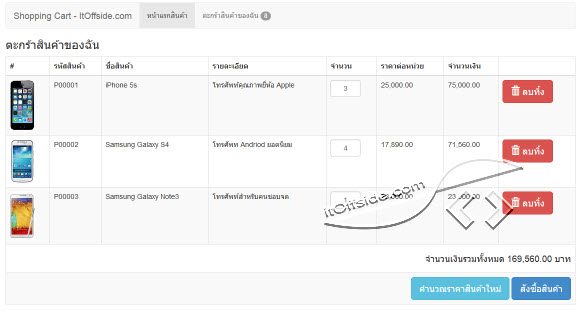
6. สร้างไฟล์ removecart.php แล้วนำ code ด้านล่างไปใส่ สำหรับการทำงานไฟล์นี้จะเป็นการลบรายการสินค้าในตะกร้าออกไปจากตัวแปร? session โดยจะลบทิ้งเฉพาะ id ที่เลือกไว้เท่านั้น
<?php
session_start();

$itemId = isset($_GET['itemId']) ? $_GET['itemId'] : "";

if (!isset($_SESSION['cart']))
{
$_SESSION['cart'] = array();
$_SESSION['qty'][] = array();
}

$key = array_search($itemId, $_SESSION['cart']);
$_SESSION['qty'][$key] = "";

$_SESSION['cart'] = array_diff($_SESSION['cart'], array($itemId));
header('location:cart.php?a=remove');
?></pre>
7. สร้างไฟล์ order.php แล้วนำ code ด้านล่างไปใส่ โดยการทำงานของไฟล์นี้จะแสดงผลรายการที่ต้องการยืนยันสั่งซื้อพร้อมจำนวนและราคาสินค้าที่ไม่สามารถแก้ไขได้(แตกต่างจาก cart.php ที่สามารถแก้ไขได้)
<pre class="lang:php decode:true" title="order.php"><?php
session_start();
require 'connect.php';

$action = isset($_GET['a']) ? $_GET['a'] : "";
$itemCount = isset($_SESSION['cart']) ? count($_SESSION['cart']) : 0;
$_SESSION['formid'] = sha1('itoffside.com' . microtime());
if (isset($_SESSION['qty'])) {
$meQty = 0;
foreach ($_SESSION['qty'] as $meItem) {
$meQty = $meQty + $meItem;
}
} else {
$meQty = 0;
}
if (isset($_SESSION['cart']) and $itemCount > 0) {
$itemIds = "";
foreach ($_SESSION['cart'] as $itemId) {
$itemIds = $itemIds . $itemId . ",";
}
$inputItems = rtrim($itemIds, ",");
$meSql = "SELECT * FROM products WHERE id in ({$inputItems})";
$meQuery = mysql_query($meSql);
$meCount = mysql_num_rows($meQuery);
} else {
$meCount = 0;
}
?>
<!DOCTYPE html>
<html lang="en">
<head>
<meta charset="utf-8">
<meta http-equiv="X-UA-Compatible" content="IE=edge">
<meta name="viewport" content="width=device-width, initial-scale=1">
<title>itoffside.com shopping cart</title>

<!-- Bootstrap -->
<link href="bootstrap/css/bootstrap.min.css" rel="stylesheet">
<link href="bootstrap/css/nava.css" rel="stylesheet">

<!-- HTML5 Shim and Respond.js IE8 support of HTML5 elements and media queries -->
<!-- WARNING: Respond.js doesn't work if you view the page via file:// -->
<!--[if lt IE 9]>
<script src="https://oss.maxcdn.com/libs/html5shiv/3.7.0/html5shiv.js"></script>
<script src="https://oss.maxcdn.com/libs/respond.js/1.4.2/respond.min.js"></script>
<![endif]-->
<script type="text/javascript">
function updateSubmit(){
if(document.formupdate.order_fullname.value == ""){
alert('โปรดใส่ชื่อนามสกุลด้วย!');
document.formupdate.order_fullname.focus();
return false;
}
if(document.formupdate.order_address.value == ""){
alert('โปรดใส่ที่อยู่ด้วย!');
document.formupdate.order_address.focus();
return false;
}
if(document.formupdate.order_phone.value == ""){
alert('โปรดใส่เบอร์โทรด้วย!');
document.formupdate.order_phone.focus();
return false;
}
document.formupdate.submit();
return false;
}
</script>
</head>
<body>
<div class="container">

<!-- Static navbar -->
<div class="navbar navbar-default" role="navigation">
<div class="container-fluid">
<div class="navbar-header">
<button type="button" class="navbar-toggle" data-toggle="collapse" data-target=".navbar-collapse">
<span class="sr-only">Toggle navigation</span>
<span class="icon-bar"></span>
<span class="icon-bar"></span>
<span class="icon-bar"></span>
</button>
<a class="navbar-brand" href="#">Shopping Cart - ItOffside.com</a>
</div>
<div class="navbar-collapse collapse">
<ul class="nav navbar-nav">
<li class="active"><a href="index.php">หน้าแรกสินค้า</a></li>
<li><a href="cart.php">ตะกร้าสินค้าของฉัน <span class="badge"><?php echo $meQty; ?></span></a></li>
</ul>
</div><!--/.nav-collapse -->
</div><!--/.container-fluid -->
</div>
<h3>รายการสั่งซื้อ</h3>
<!-- Main component for a primary marketing message or call to action -->
<?php
if ($action == 'removed')
{
echo "<div class=\"alert alert-warning\">ลบสินค้าเรียบร้อยแล้ว</div>";
}

if ($meCount == 0)
{
echo "<div class=\"alert alert-warning\">ไม่มีสินค้าอยู่ในตะกร้า</div>";
} else
{
?>

<form action="updateorder.php" method="post" name="formupdate" role="form" id="formupdate" onsubmit="JavaScript:return updateSubmit();">
<div class="form-group">
<label for="exampleInputEmail1">ชื่อ-นามสกุล</label>
<input type="text" class="form-control" id="order_fullname" placeholder="ใส่ชื่อนามสกุล" style="width: 300px;" name="order_fullname">
</div>
<div class="form-group">
<label for="exampleInputAddress">ที่อยู่</label>
<textarea class="form-control" rows="3" style="width: 500px;" name="order_address" id="order_address"></textarea>
</div>
<div class="form-group">
<label for="exampleInputPhone">เบอร์โทรศัพท์</label>
<input type="text" class="form-control" id="order_phone" placeholder="ใส่เบอร์โทรศัพท์ที่สามารถติดต่อได้" style="width: 300px;" name="order_phone">
</div>
<table class="table table-striped table-bordered">
<thead>
<tr>
<th>รหัสสินค้า</th>
<th>ชื่อสินค้า</th>
<th>รายละเอียด</th>
<th>จำนวน</th>
<th>ราคาต่อหน่วย</th>
<th>จำนวนเงิน</th>
</tr>
</thead>
<tbody>
<?php
$total_price = 0;
$num = 0;
while ($meResult = mysql_fetch_assoc($meQuery))
{
$key = array_search($meResult['id'], $_SESSION['cart']);
$total_price = $total_price + ($meResult['product_price'] * $_SESSION['qty'][$key]);
?>
<tr>
<td><?php echo $meResult['product_code']; ?></td>
<td><?php echo $meResult['product_name']; ?></td>
<td><?php echo $meResult['product_desc']; ?></td>
<td>
<?php echo $_SESSION['qty'][$key]; ?>
<input type="hidden" name="qty[]" value="<?php echo $_SESSION['qty'][$key]; ?>" />
<input type="hidden" name="product_id[]" value="<?php echo $meResult['id']; ?>" />
<input type="hidden" name="product_price[]" value="<?php echo $meResult['product_price']; ?>" />
</td>
<td><?php echo number_format($meResult['product_price'], 2); ?></td>
<td><?php echo number_format(($meResult['product_price'] * $_SESSION['qty'][$key]), 2); ?></td>
</tr>
<?php
$num++;
}
?>
<tr>
<td colspan="8" style="text-align: right;">
<h4>จำนวนเงินรวมทั้งหมด <?php echo number_format($total_price, 2); ?> บาท</h4>
</td>
</tr>
<tr>
<td colspan="8" style="text-align: right;">
<input type="hidden" name="formid" value="<?php echo $_SESSION['formid']; ?>"/>
<a href="cart.php" type="button" class="btn btn-danger btn-lg">ย้อนกลับ</a>
<button type="submit" class="btn btn-primary btn-lg">บันทึกการสั่งซื้อสินค้า</button>
</td>
</tr>
</tbody>
</table>
</form>
<?php
}
?>

</div> <!-- /container -->

<!-- jQuery (necessary for Bootstrap's JavaScript plugins) -->
<script src="bootstrap/js/jquery.min.js"></script>
<!-- Include all compiled plugins (below), or include individual files as needed -->
<script src="bootstrap/js/bootstrap.min.js"></script>
</body>
</html>
<?php
mysql_close();
?>
ผลลัพธ์
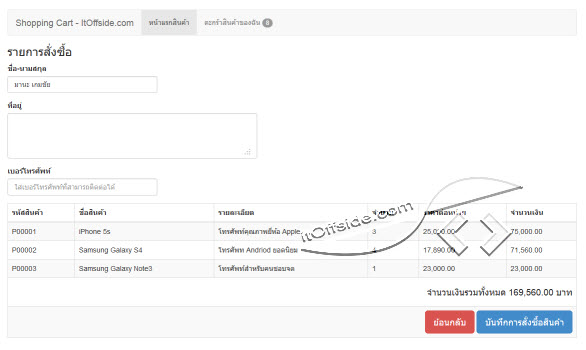
8. สร้างไฟล์ updateorder.php แล้วนำ code ด้านล่างนี้ไปใส่ จากตัวอย่าง code การทำงานของ code นี้คือจะบันทึกข้อมูลการสั่งซื้อสินค้าและผู้สั่งซื้อสินค้าจากฟอร์ม order.php ทันทีเมื่อมีการคลิกปุ่ม "บันทึกการสั่งซื้อสินค้า"
<?php
session_start();
$formid = isset($_SESSION['formid']) ? $_SESSION['formid'] : "";
if ($formid != $_POST['formid']) {
	echo "E00001!! SESSION ERROR RETRY AGAINT.";
} else {
	unset($_SESSION['formid']);
	if ($_POST) {
		require 'connect.php';
		$order_fullname = mysql_real_escape_string($_POST['order_fullname']);
		$order_address = mysql_real_escape_string($_POST['order_address']);
		$order_phone = mysql_real_escape_string($_POST['order_phone']);
$meSql = "INSERT INTO orders (order_date, order_fullname, order_address, order_phone) VALUES (NOW(),'{$order_fullname}','{$order_address}','{$order_phone}') ";
$meQeury = mysql_query($meSql);
if ($meQeury) {
$order_id = mysql_insert_id();
for ($i = 0; $i < count($_POST['qty']); $i++) {
$order_detail_quantity = mysql_real_escape_string($_POST['qty'][$i]);
$order_detail_price = mysql_real_escape_string($_POST['product_price'][$i]);
$product_id = mysql_real_escape_string($_POST['product_id'][$i]);
$lineSql = "INSERT INTO order_details (order_detail_quantity, order_detail_price, product_id, order_id) ";
$lineSql .= "VALUES (";
$lineSql .= "'{$order_detail_quantity}',";
$lineSql .= "'{$order_detail_price}',";
$lineSql .= "'{$product_id}',";
$lineSql .= "'{$order_id}'";
$lineSql .= ") ";
mysql_query($lineSql);
}
mysql_close();
unset($_SESSION['cart']);
unset($_SESSION['qty']);
header('location:index.php?a=order');
}else{
mysql_close();
header('location:index.php?a=orderfail');
}
}
}
?>
เสร็จแล้วสำหรับระบบตะกร้าสั่งซื้อสินค้าโดยใช้ฟังก์ชั่น Session และ Array แบบง่ายๆผู้อ่านสามารถดาวน์โหลด Source Code ได้ที่ลิงค์ด้านล่างนี้เลยครับ
<a title="ดาวน์โหลดระบบตะกร้าสั่งซื้อสินค้า" href="http://www.mediafire.com/download/heagbrrad3fricl/shopping_cart.rar" target="_blank" rel="noopener noreferrer">ดาวน์โหลดไฟล์ระบบตะกร้าสั่งซื้อสินค้า!</a>รหัสแตกไฟล์ rar = www.itoffside.com
แชร์บทความนี้
โปรแกรมเมอร์

ความเห็น (257)