 itOffside
ใช้ Datatables กับ Codeigniter แบบ Server-Side (Ajax)
Ajax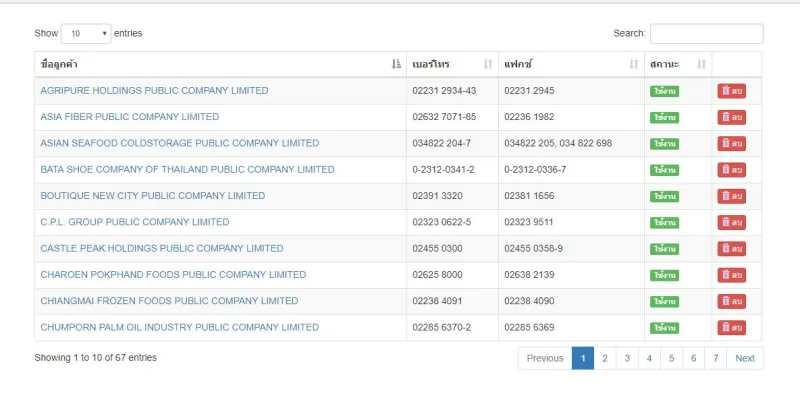
สวัสดีครับคุณผู้อ่านทุกท่าน เมื่อคราวที่แล้ว ผมได้มีการลงบทความ การใช้งาน Datatables แบบบ้านๆ โดยใช้ PHP ธรรมดาในการ ทำงาน ซึ่งทางผมเองคาดว่าผู้อ่าน จะได้รับประโยนช์จากบทความ ไม่มากก็น้อยครับ
ดังนั้นในบทความนี้ ผมก็เลยมาสอนการใช้ Datatables กับ Codeigniter ว่าต้องทำอย่างไรบ้าง เริ่มจากตรงไหนบ้าง ซึ่งบทความนี้เหมาะกับคนที่เคยเขียน Codeigniter และเขียน javascript พอได้ ครับ
Demo
http://sysapp.itoffside.com/datatables_ci/
Download
https://github.com/ipball/datatables_ci/archive/master.zip
Clone git
https://github.com/ipball/datatables_ci.git
สิ่งที่ต้องเตรียม
1. ไฟล์ plugins Datatables
2. ไฟล์ jQuery
3. Bootstrap framework
4. Codeiniter framework
5. ฐานข้อมูล
เริ่มต้นกันเลยครับ
สร้างฐานข้อมูลชื่อ datatables แล้ว import ไฟล์ sql (ในข้อ 5)
กำหนด application/config/config.php

กำหนด application/config/database.php ให้ตรงตามค่าเซฟเวอร์
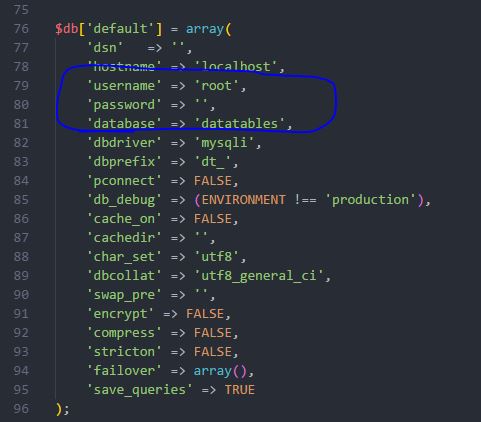
ให้เราสร้างไฟล์ index.php ไว้ในไฟล์ Application/view/
จะได้เป็น Application/view/index.php
ต่อมาให้เราทำการ Include ไฟล์ jquery, bootstrap, dataTables ไว้ <body> นะครับ จากตัวอย่างไว้ ล่างสุดของ body
โดยไฟล์ที่เพิ่มจะมีด้วยกัน 4 ไฟล์นะครับ ซึ่งมี jquery, bootstrap, datatables(2 ไฟล์)
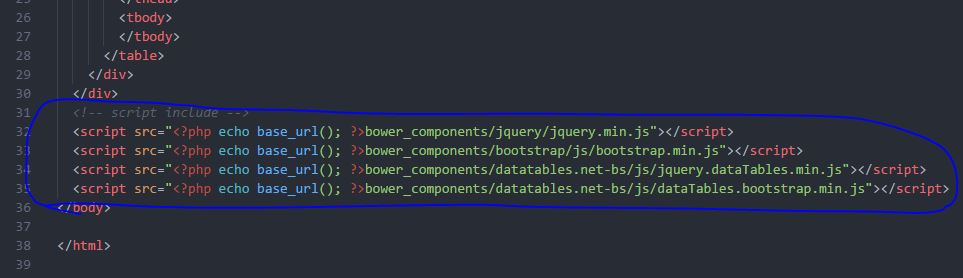
จากนั้น เพิ่ม css ไฟล์ไว้ใน <header> ตามรูปภาพด้านล่าง
โดยมีด้วยกัน 2 ไฟล์คือ ไฟล์ bootstrap, datatables สำหรับ bootstrap
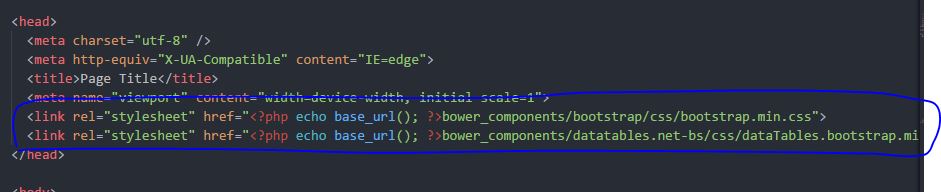
เมื่อเรา include ไฟล์ js, css มาครบแล้วที่นี้เราก็พร้อมที่จะใช้งานแล้วครับ แต่เราต้องสร้างตาราง ไว้ใน <body> กันก่อน สร้างตารางตามรูปภาพด้านล่างนี้เลยนะครับ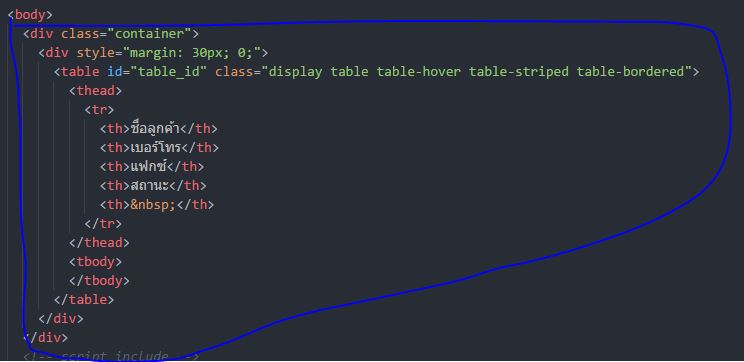
จากนี้จะเป็นการเรียกใช้งาน datatables โดยใช้ jQuery นะครับ โดยผมจะนำโค้ดไว้ล่างสุด ก่อน </body> ลองดูตัวอย่างโค้ดครับ
<script type="text/javascript">
    $(document).ready(function () {
      var table = $('#table_id').DataTable({
        pageLength: 10,
        serverSide: true,
        processing: true,
        ajax: {
          url:'<?php echo site_url('customer/find_with_page'); ?>'
        },
        'columns':[
        {
          data:'name',
          render: function(data, type, row){
            return '<a href="<?php echo site_url('customer/edit/'); ?>'+row['id']+'">'+data+'</a> ';
          }
        },
        {
          data:'phone'
        },
        {
          data:'fax'
        },
        {
          data:'state',
          render: function (data,type,row){
            var active = '<span class="label label-success">ใช้งาน</span>';
            var inactive = '<span class="label label-danger">ยกเลิก</span>';
            var status = (data==true) ? active : inactive;
            return status;
          }
        },
        {
          data:'id',
          render:function(data,type,row){
            var dataName = row['name'];
            var btnDelete = '<a href="#" data-href="<?php echo site_url('customer/delete'); ?>" data-id="'+data+'" data-name="'+dataName+'" role="button" class="btn btn-danger btn-xs"><i class="glyphicon glyphicon-trash"></i> ลบ</a>';
            return btnDelete;
          },
          orderable: false
        }
        ]
      });
    })
  </script>
ภาพตัวอย่าง
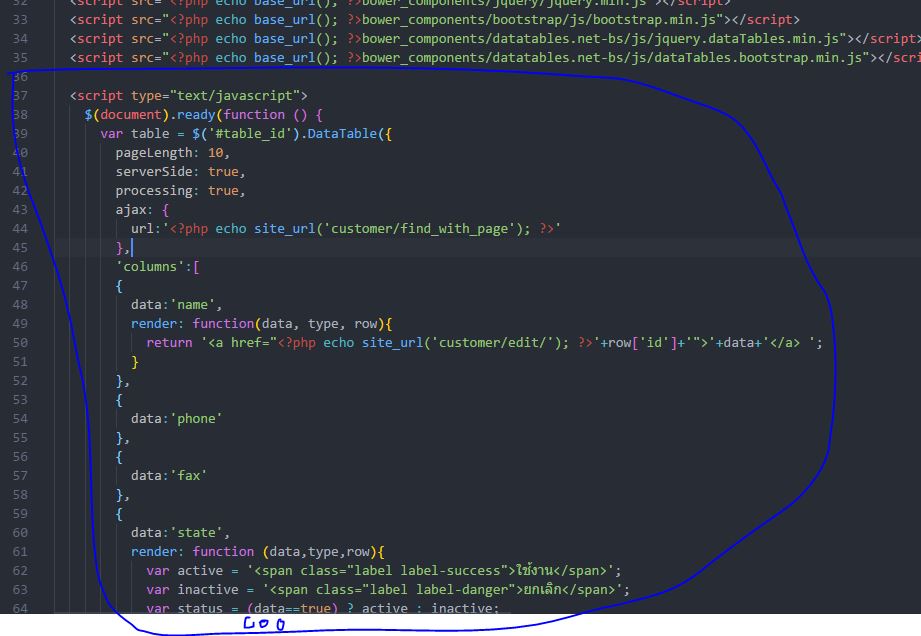
อธิบายโค้ดคำสั่ง
โดยสังเกตุ นะครับ ว่าโค้ด jQueryส่วนของ var table = $('#table_id') จะต้องตรงกับ <table id="table_id"> เพื่อใช้ในการอ้างอิงการทำงาน
- pageLength หมายถึงจำนวนต่อหน้าที่แสดงผล
- serverSide หมายถึง เปิดใช้งานโหมด server-side
- processing หมายถึง เวลามีการเปลี่ยนแปลงข้อมูลให้แสดง label loading ขึ้นมา
- ajax { url:...} หมายถึงการเรียกดึงข้อมูลจาก server ในตัวอย่างดึงข้อมูลจาก site_url('customer/find_with_page') นั้นหมายถึง ว่าเราต้องมี controller ชื่อ Customer และ Method ชื่อ find_with_page เดี่ยวเราจะมาสร้าง Controller กันต่อครับ
- 'columns':[] หมายถึง คอลัมน์ใน datatables มีอะไรบ้างเราสามารถกำหนดได้ที่นี้โดยอ้างอิงจากฟิล์ดข้อมูลที่เราดึงมาจาก server ด้วยครับ เช่นเราดึงข้อมูลมีฟิล์ด id, name, age ดังนั้นจะได้ 'columns':[data:'name', data:'age'] โดยโค้ดนี้จะแสดง คอลัมน์ name, age ครับ กรณีถ้าเราต้องการ style column เราก็ใช้คำสั่ง render เช่น
        'columns':[
        {
          data:'name',
          render: function(data, type, row){
            return '<a href="<?php echo site_url('customer/edit/'); ?>'+row['id']+'">'+data+'</a> ';
          }
        },
สำหรับ view/index.php ก็มีเพียงเท่านี้นะครับ ต่อไปเราจะมาเขียนโค้ดในส่วนของ Controller และ Model กันต่อ
สร้างไฟล์ Customer.php ในโฟล์เดอร์ application/controllers
จะได้เป็น application/controllers/Customer.php
แล้วให้นำโค้ดนี้ไปวางไว้ใน ไฟล์ครับ
<?php
defined('BASEPATH') or exit('No direct script access allowed');

class Customer extends CI_Controller
{
    public function __construct()
    {
        parent::__construct();
        $this->load->model('Customer_model');
    }

    public function index()
    {
        $this->load->view('customer/index');
    }

    public function find_with_page()
    {
        $order_index = $this->input->get('order[0][column]');
        $param['page_size'] = $this->input->get('length');
        $param['start'] = $this->input->get('start');
        $param['draw'] = $this->input->get('draw');
        $param['keyword'] = trim($this->input->get('search[value]'));
        $param['column'] = $this->input->get("columns[{$order_index}][data]");
        $param['dir'] = $this->input->get('order[0][dir]');

        $results = $this->Customer_model->find_with_page($param);

        $data['draw'] = $param['draw'];
        $data['recordsTotal'] = $results['count'];
        $data['recordsFiltered'] = $results['count_condition'];
        $data['data'] = $results['data'];
        $data['error'] = $results['error_message'];

        $this->output->set_content_type('application/json')->set_output(json_encode($data));
    }
}
อธิบายโค้ด
Method find_with_page
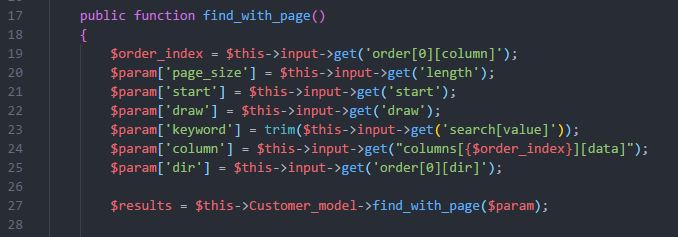
จากรูปภาพด้านบน ตัวแปรอาเรย์ $param รับค่าจาก datatables มา แล้วเรานำค่านี้ส่งไปยัง model เพื่อ query ข้อมูลตามเงื่อนไขของ datatables เช่น ต้องการแสดงหน้า 2 หรือต้องการ sort ตารางนะครับ
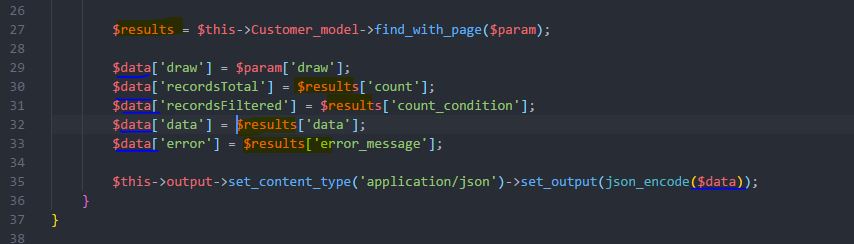
จากรูปภาพด้านบน บรรทัดที่ 27 เราใช้ model ในการ get ค่าจากฐานข้อมูลมาแล้วไว้ใน $results แล้ว ก็ส่งตอบกลับไปที่ datatables ในแบบ JSON ครับโดยจำเป็นต้องส่งไปคือข้อมูล
- draw
- recordsTotal หมายถึงจำนวนทั้งหมดของข้อมูล
- recordsFiltered หมายถึงจำนวนทั้งหมดของข้อมูลที่ กรองมาแล้ว
- data หมายถึงข้อมูล เช่น name, email, phone
- error หมายถึง error ข้อผิดพลาดจากการเรียกข้อมูล ถ้าไม่มีให้ใส่เป็นค่าว่าง
สำหรับ Controller มีเพียงเท่านี้ครับ แล้วเรามาเขียนส่วนของ Model ว่าทำอย่างไรถึงจะโยนข้อมูลในรูปแบบนี้มาให้ Controller
สำหรับ Model ให้เราสร้างไฟล์ Customer_model.php ไว้ในโฟล์เดอร์ application/models
ได้เป็น application/models/Customer_model.php
จากนั้นให้เรานำโค้ดนี้ไปใส่ในไฟล์
<?php
defined('BASEPATH') OR exit('No direct script access allowed');
class Customer_model extends CI_Model {
	public function __construct(){
		parent::__construct();
	}

	public function find_with_page($param){
		$keyword = $param['keyword'];
		$this->db->select('*');

		$condition = "1=1";
		if(!empty($keyword)){
			$condition .= " and (name like '%{$keyword}%' or phone like '%{$keyword}%')";
		}

		$this->db->where($condition);
		$this->db->limit($param['page_size'], $param['start']);
		$this->db->order_by($param['column'], $param['dir']);

		$query = $this->db->get('customer');
		$data = [];
		if($query->num_rows() > 0){
			foreach($query->result() as $row){
				$data[] = $row;
			}
		}

		$count_condition = $this->db->from('customer')->where($condition)->count_all_results();
		$count = $this->db->from('customer')->count_all_results();
		$result = array('count'=>$count,'count_condition'=>$count_condition,'data'=>$data,'error_message'=>'');
		return $result;
	}
}
อธิบายโค้ด
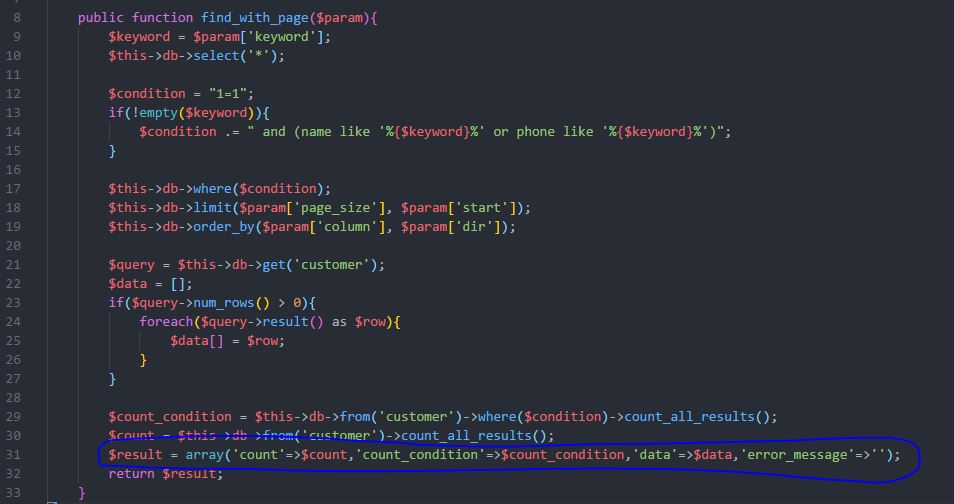
จากรูปภาพด้านบน
บรรทัด 9 - 27 เป็นการ get ข้อมูลจากฐานข้อมูลโดยมีเงื่อนไขต่างๆที่รับตัวแปรมาจาก controller ครับ
บรรทัดที่ 29 คือ จำนวนทั้งหมดของข้อมูลแบบที่กรองข้อมูลมาแล้ว
บรรทัดที่ 30 คือ จำนวนข้อมูลทั้งหมด
บรรทัดที่ 31 คือ $result คืนค่าข้อมูลแบบ array มาโดยมี count, count_condition, data ,error_message
เสร็จแล้วครับ ผลลัพท์ได้เป็นดังนี้
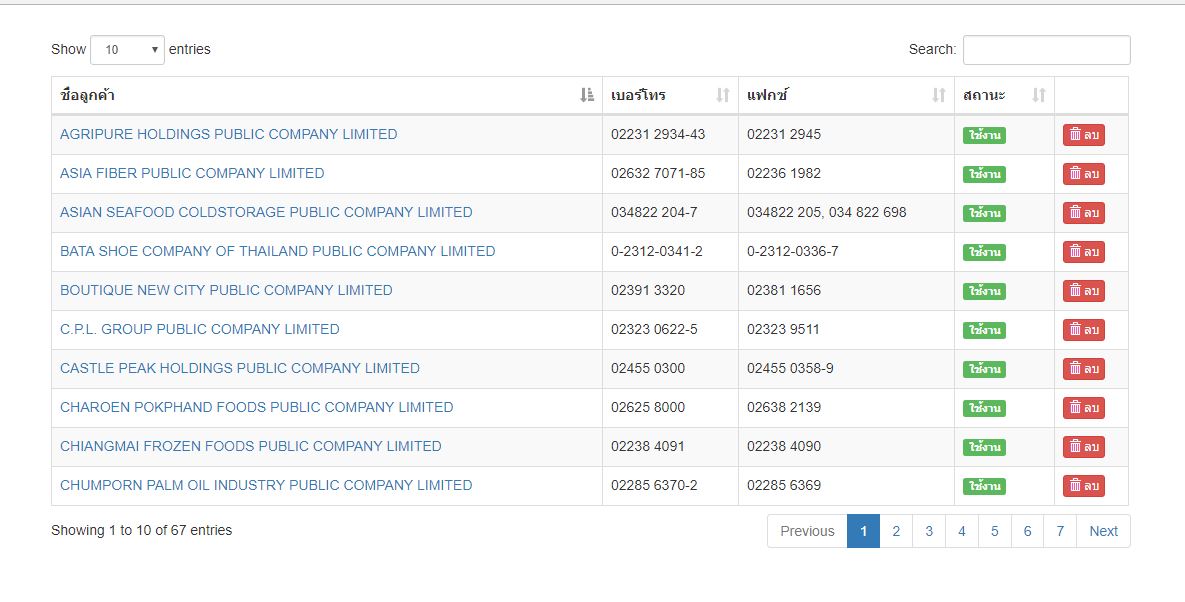
เราสามารถ sort column ได้ ค้นหาชื่อลูกค้าได้ สามารถกำหนด style ใน column ได้ สามารถกำหนดว่าจะแสดงกี่แถวในหนึ่งหน้าได้ ซึ่งผมว่า datatables เหมาะนำไปใช้งานเกือบทุกๆงาน ครับ
จบแล้วครับสำหรับการใช้ dataTables กับ Codeigniter หากใครมีคำถามข้อสงสัยเพิ่มเติมสามารถเขียนความเห็นด้านล่างไว้เลยนะครับ
แชร์บทความนี้
โปรแกรมเมอร์

ความเห็น (2)